2/1/2010

Free Digital Scrapbook Template #59

Filed under: — No Reimer Reason @ 9:26 pm

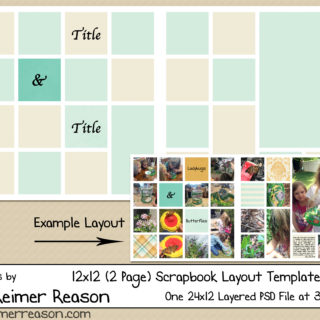
I had a chance to get some scrapping done yesterday, so I have another template that I would love to give away.

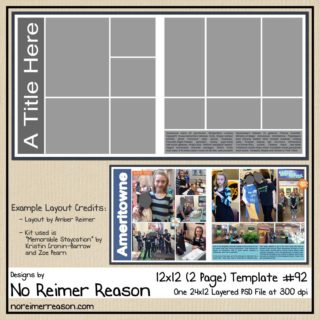
There is a download for the 12×12 PSD file as well as a separate download for the PNG files if you use a program other than Photoshop. You can click on the preview to be brought to my download page that contains all of my available digital scrapbook freebies.

If you need inspiration, here are the two layouts I put together which were what I created the template from.

Credits: Rub A Dub Kit by Kristen Cronin-Barrow

1/25/2010

One More Reason I Love Digital Scrapbooking – and a FREE Template

Filed under: — No Reimer Reason @ 11:14 pm

Wow, I think this is the longest time I have ever gone without a post on here in quite awhile. I guess I will use our new daughter as my excuse. Bree is now 5 weeks old. Born just a few days before Christmas, she was a wonderful gift!

After she was born, I realized that I still haven’t scrapped most of Adrianna’s baby photos yet. Rather than stressing about all the layouts I will have yet to do, now times two, I recognized that digital scrapbooking can help me simplify my scrapping in that I can make ONE general layout for a baby event (for daughter #1) and simply use that layout as a template to quickly make a second layout with photos of daughter #2. I can also easily clip papers and embellishments from a different kit to the layers of the original layout as well. This should be a huge time-saver for me, since coming up with the layout design idea is usually what takes me the longest when making a page.

So here is the same baby event (getting ready to head to the hospital to deliver) for both daughters. Same general design, two separate layouts created from one original PSD file.

Layout #1                                          Layout #2

Credits: Inspiration for the layout from this page by Eva Kipler; Ribbon by Dani Alencar ”On this day” kit; Kit on layout #1 and flowers by Paislee Press “On this day”; Kit on layout #2 by Jennifer Barrette “Chilled”

And of course I made a template out of my layout so it can save you some time too. :)

There is a download for the 12×12 PSD file as well as a separate download for the PNG files if you use a program other than Photoshop. You can click on the preview to be brought to my download page containing all of my available digital scrapbook freebies.

12/6/2009

Scan Those Old Photos Before it is Too Late

Filed under: — No Reimer Reason @ 11:37 pm

I recently borrowed some old photo albums from my parents. In particular, I was interested in perusing through my baby pictures since we are expecting a baby soon and it is fun to compare baby pictures. I was amazed (and very saddened) at how yellow/red the pictures were. Aren’t just the photos of your parents and grandparents supposed to be discolored? Man, talk about making me suddenly feel old! These pictures are only 32 years old (from the late 1970s).

They were in an magnetic photo album popular during that time (the kind with the sticky pages and plastic overlays). As many scrapbookers are aware, older albums are often not acid-free or lignin-free. Acid-free and lignin-free means that the item (in this case, the album pages) has gone through a process to make sure it won’t discolor or deteriorate the photos.

So I decided that I needed to get on the ball and scan in all my photos ASAP. I may not be able to reverse the damage already done, but at least I can capture them before further damage happens. And I can do some manipulation with Photoshop to help with some of the coloration.

But I found that my photos were stuck TIGHT. I have seen a few tips online on how to remove them (including freezing the album overnight, hairdrying the pictures, manipulating unwaxed dental floss underneath the photos, and using a product called UNDO), but I haven’t tried any of these yet. In the interest of saving time, I decided to cut out each entire page and then scan each page in. I scanned them in at 600 PPI.

After scanning, I am importing the scanned pages into Photoshop and cropping around each photo and creating PSD files out of each (so I don’t mess with the original scanned file). Then, I am making repairs to the photos using Photoshop’s clone stamp tool and patch tool to help with any perfections on the photo that happened due to age or the scanning process. I also am using the Variations, AutoLevels, and AutoColor options (all found under Image/Adjustments) to help bring some color variation back to the photos. I do each change on a separate layer so I can mess with opacity and play with the different options to find the best one.

I am sure a professional could do a much more thorough and impressive re-coloration, but I have hundreds of photos to do so fast and easy is the route I am taking. I will be keeping the original scans in case I want to revisit any of the pictures’ restoration in the future. The nice thing about getting these scanned in is that they are captured “as is” and the digital file will not deteriorate even if the original photo continues to do so.

Do you have any fast and easy tips for recoloring old yellow/red photos? I would love to hear any suggestions!

My original scans are on the left with the modified/repaired photo on the right. These are of me at 1-2 months old.

Original Repaired / Edited

Original Repaired / Edited

Original Repaired / Edited

So my encouragement to you is to scan in your old photos as soon as you can, even if you don’t have time to make edits or repairs to those scans now. You won’t regret your proactive prevention of your precious photos’ further discoloration and damage since you will have a digital copy that will be saved for later repair. You can bet that I asked my mom to bring me some more albums on their next visit so I can continue scanning my valuable memories in.

11/23/2009

Free Digital Scrapbook Template #57

Filed under: — No Reimer Reason @ 10:27 am

Good morning! I should be spending my free day cleaning my very messy house for Thanksgiving company, but instead I felt like playing with Photoshop. As a result, I have a free digital scrapbook template with room for 3 photos available for download. :)

There is a download for the 12×12 PSD file as well as a separate download for the PNG files if you use a program other than Photoshop.

Here is the layout that this template was created from if you need some inspiration.

11/16/2009

FREE WordArt – Wonder of a Sunset

Filed under: — No Reimer Reason @ 9:13 pm

I created this word art for a scrapbook layout I was working on and thought I would share it with you.

The quote is from Mahatma Gandhi and states, “When I admire the wonder of a sunset or the beauty of the moon, my soul expands in worship of the Creator.” You can click on the image above to be brought to my digital scrapbook freebies download page.

This is the layout I created it for, in case you need any inspiration. :)

11/6/2009

November Multiple Photo Challenge – and a FREE Template

Filed under: — No Reimer Reason @ 11:42 pm

I have posted the November Multi-Photo Challenge over at GDS.

This will probably be the last Multi-Photo challenge that I host for awhile. Baby #2 is due at the end of December, so I am anticipating a new “challenge” for our family that may keep me away from scrapping for awhile. ;)

As always, there are only TWO rules for this challenge:

1. Create a NEW layout containing at least 4 photos.
2. Post your layout in the Multi-Photo Challenge Gallery. Layouts must be posted by November 30th.

As always, I am providing a free multi-photo template that you are welcome to use if you need some inspiration for this challenge. (It comes in PSD and PNGs.) However, using this template is NOT required. Any new layout containing at least 4 photos qualifies.

No Reimer Reason - Free Digital Scrapbook Template

You can download the template for FREE, no strings attached, at the GDS Multi-Photo Challenge thread.

And, if you complete this challenge and post your layout in the Multi-Photo Challenge gallery by November 30th, you will receive this template as your free posting bonus:

I am looking forward to seeing your layouts!

10/29/2009

Free Digital Scrapbook Quick Page – Remember the Magic #2

Filed under: — No Reimer Reason @ 9:17 pm

How would you like another free digital scrapbook QP from my latest kit, “Remember the Magic“? This one would make a great second page to the first QP I gave out a couple weeks ago. At least that is how I am using it for my own layouts.

You can click on the image preview above to be brought to my list of freebies available for download.

And here is my layout that the QP was created from. It is more pictures of my daughter meeting Mickey for the first time.

Thanks for your comments. They always make my day. :)

10/20/2009

Free “Remember the Magic” Quick Page

Filed under: — No Reimer Reason @ 11:21 am

Today I have a free digital scrapbook QP available for download from my latest kit, “Remember the Magic“.

You can click on the image preview to be brought to my list of freebies available for download.

And here is my layout that the QP was created from. It is of my daughter meeting Mickey for the first time. She hugged him for a LONG time.

10/16/2009

FREE Digital Scrapbook Kit – Remember the Magic

Filed under: — No Reimer Reason @ 9:17 pm

We took our first trip to Disneyland back in March. As I was going to start scrapping the many photos this past week, I realized I didn’t have any kits that were exactly what I was looking for in the colors I was looking for. Specifically, the red of my daughter’s Minnie Mouse dress and the black of Mickey’s ears. So, I decided to make my own papers using the exact colors from my photos and it evolved into a mini-kit that I would love to share with you.

You can click on the image preview to download.

Hope you have a wonderful weekend!

10/10/2009

October Multiple Photo Challenge – and a FREE Template

Filed under: — No Reimer Reason @ 2:03 pm

I have posted the October Multi-Photo Challenge over at GDS.

As always, there are only TWO rules for this challenge:

1. Create a NEW layout containing at least 4 photos.
2. Post your layout in the Multi-Photo Challenge Gallery. Layouts must be posted by October 31st.

As always, I am providing a free multi-photo template that you are welcome to use if you need some inspiration for this challenge. However, using this template is NOT required. Any new layout containing at least 4 photos qualifies.

No Reimer Reason - Free Digital Scrapbook Template

You can download the template for FREE, no strings attached, at the GDS Multi-Photo Challenge thread.

And, if you complete this challenge and post your layout in the Multi-Photo Challenge gallery by October 31st, you will receive this template as your free posting bonus:

I am looking forward to seeing your layouts!

9/25/2009

Simplifying Scrapbooking Using Project 365

Filed under: — No Reimer Reason @ 8:11 pm

If I look only at my progress in taking at least one photo a day for the Project 365 resolution, I have to admit that I have failed. Miserably. I have gone through a range of ideas of what to do to salvage the project in my mind.

After my deliberation, it all came down to this: Do I continue with my original idea of making a separate scrapbook album of the Project 365 photos, showing a nice snapshot of our year even though there won’t be a photo every single day? Or do I just give up altogether and just be glad for the extra photos to fill my albums that I might not have taken otherwise?

Option 1 still seemed like a good option, although it would end up being a much smaller album than originally planned. Option 2 seemed a bit daunting at first. Sure, I am thankful for the extra photos but that also means EXTRA scrapbook pages to create, and goodness knows I am already behind on scrapping my photos. So I decided on a mix of the two.

I decided that I would continue scrapping my “photo-a-day” photos, making one layout for the week of photos. Or sometimes 2 weeks to a layout since I didn’t get an actual photo every day. But, instead of having these layouts be placed in a separate album, I will place them into my regular album. My albums are in sequential order, so they will simply be placed in order like any other layout.

After I made this decision, I began to realize how free-ing this will be for me. Here’s why:

  1. Even without considering the Project 365 photos, I often have a lot of photos where there is only 1 shot of an event or day. But if I still continue to scrap layouts that are a week’s compilation of one photo per day, it would be an easy way to get many of them scrapped and journaled without feeling the pressure of making up to 7 layouts that consist of just 1 or 2 photos each.
  2. Sure, the photos won’t be of the same event or same subject matter, but they won’t be expected to be since they will still be part of the Project 365 layouts.
  3. Without the pressure to complete so many separate layouts for the extra photos that don’t have a “place” or a special memory to warrant their own page, I will *maybe* catch up on my scrapping for the year. (haha, if only!)
  4. I will still get that snapshot of our everyday lives with these layouts, which is what I was hoping for.
  5. I am keeping my Project 365 layouts very simple. Uniform background. Simple titles stating the week and dates. Photos. Simple journaling for each photo. I often reuse the same templates and just flip them. Quick and EASY!!

Example:

Some of these photos are ones that I would have wanted to include in my scrapbook album even though I only had 1 from the event. But instead of having to make several 1-photo layouts, I can make ONE multi-photo layout of our week, including journaling. In doing so, I also capture a snapshot of our week in some of the other photos that might not have normally been deemed “scrap-worthy” even though I am glad to be able to look back at them now with this layout and still remember what was going on in our lives.

After getting started with this idea, I have been able to scrap 2 months worth of photos in less than 1 month. This includes my regular layouts and the ones that I put onto my Project 365 layouts. Hooray!

How are you doing with your Project 365 goals, photos, or layouts?

9/8/2009

FREE Digital Scrapbook QP

Filed under: — No Reimer Reason @ 8:04 pm

It’s been awhile since I have given away any freebies that weren’t Multi-Photo challenge related. I hope to change that now that summer is over! So, to start off, I have a free 12×12 digital scrapbook quick page for you all. Hope you enjoy!

You can click on the image to be brought to my list of freebies available for download.

Comments are always appreciated. ;)

9/4/2009

September Multi-Photo Challenge – and a FREE Template

Filed under: — No Reimer Reason @ 8:49 pm

I have posted the September Multi-Photo Challenge over at GDS. This month, the templates could be used together to create an easy 2-page layout with lots of photos. I know I tend to get overwhelmed when I have a large event to scrap that has a lot of photos that I want to include on my pages; I am hoping these will help you on those big projects.

As always, there are only TWO rules for this challenge:

1. Create a NEW layout containing at least 4 photos.
2. Post your layout in the Multi-Photo Challenge Gallery. Layouts must be posted by September 30th.

As always, I am providing a free multi-photo template that you are welcome to use if you need some inspiration for this challenge. However, using this template is NOT required. Any new layout containing at least 4 photos qualifies.

You can download the template for FREE, no strings attached, at the GDS Multi-Photo Challenge thread.

And, if you complete this challenge and post your layout in the Multi-Photo Challenge gallery by September 30th, you will receive this template as your free posting bonus:

I am looking forward to seeing your layouts!

8/30/2009

Scrapbook Layouts

Filed under: — No Reimer Reason @ 12:25 pm

Some of the layouts I have completed in the past couple of months.

Credits: “Just us Girls” Kit by RK Designs


Credits: QP by WM Squared Designs


Credits: QP by cshulthies (from the Scrapper’s Guide QP Album)


Credits: “My Girls” Kit by Neverland Scraps; Embellishments by Kate Hatfield


Credits: “Relax” Kit by Summertime Designs

8/11/2009

Multi-Photo Challenge and FREE Template – August 2009

Filed under: — No Reimer Reason @ 7:50 pm

Hello everyone! Are you ready for the August Multi-Photo Challenge?

As always, there are only TWO rules for this challenge:

1. Create a NEW layout containing at least 4 photos.
2. Post your layout in the Multi-Photo Challenge Gallery. Layouts must be posted by August 31st.

I will offer up a free multi-photo template that you are welcome to use if you need some inspiration for this challenge. However, using this template is NOT required. Any new layout containing at least 4 photos qualifies.

You can download the template for FREE, no strings attached, at the GDS Multi-Photo Challenge thread.

And, if you complete this challenge and post your layout in the Multi-Photo Challenge gallery by August 31st, you will receive this template as your free posting bonus:

I am looking forward to seeing your layouts!